Review: Stand-up Desk

After 4 weeks of trailing a stand-up desk (the Sit-Stand Workstation from Contour) I’d like to share my experience and offer some observations.

Don’t Spend Too Much. My model is on Amazon for around £160 ($180), which is considerably cheaper than full desks with electronic pneumatics (at £500+). The Contour requires a reasonably solid desk upon which to mount it, and my desk has a glass top too, but the end result is actually very solid. Obviously it’s only the weight of the monitor, keyboard and mouse that it’s holding … although the thing itself is pretty heavy.

Mix It Up. I have not yet managed to stand all day, but think that a variety is a good thing. I try to get 50% of my time standing as a minimum. I seem to like to take calls sitting, and do work standing. I am also currently trailing the Pomodoro Technique (article to follow), which means lots of short breaks and works well with a sit-stand mix.

Stand Properly. Just like sitting, a good standing posture is important. If you have a habit of putting all your weight on one leg, or in odd foot positions, then just make sure you don’t stay in a bad position for too long. I seem to naturally shuffle every few minutes.

Keep Drinks Safe. Because I am raising and lowering part of my desk it makes sense for liquids to be aware from the moving area.

Longer Cables. As I put together the desk it was clear that power and other cables would be stretched when I raise the desk. Just something to look out for, else things can get dangerous.

Manage Breaks. When you’re already out of the chair, you might find yourself wandering off, away from work. Most of the time this is a good thing, as long as you don’t get more snacks and do return fairly quickly.

Keep Going. The first week the thing mostly remained in sit position. Week two saw more standing, and so did week three. So it was a gradual adoption and required a little getting used it. Now I am going to keep using it for sure.


Using Tasks and Short-Breaks To Stay Focused

It is impossible to not get distracted … however you can take some deliberate control of this.

I found my brain tries to take more ‘deliberate’ breaks when working at home. I speculate this is because there is none of the low-level distraction you get in an office, where people are moving around and things are happening. Home is quiet and still, and while this reduces ‘significant’ distraction, it’s hard to keep your mind occupied in an entirely static environment.

As such homeworkers might be tempted to introduce some minor distractions, and without carefully consideration this can lead down the path of using ‘background entertainment’. Using media to fill this gap is possible – music or radio is rarely fully distracting – however vision-intensive activities like monitoring social media and watching video/TV clearly are. I also use the following two tips to help:

Non-work Distractions. These satisfy the mind but you know are ‘safe’ to do – i.e. short and low impact. Examples are hanging out the washing, emptying the dishwasher, vacuuming, or even walking the dog at lunch. Done in moderation, everyone can benefit.

Varied To-Do. I also use a mix of activity types on my To-Do list to satisfy my brain wandering. Ideally every day has a little research, communication, administration, creative work, and some content generation. Clearly depends on your job, but variety is the spice of life!

My Top 5 Healthy Snacks for Homeworking

The following are my picks for snacks that don’t spoil you appetite or impact your well-being.

1. Nothing. Yes really – snacks are harmful, distracting and simply indulgent. If you can, just go without.

2. Nuts – ideally unsalted and a small helping only. I find almonds, peanuts and cashews are good. Warning: can be messy and make you cough on calls!

3. Fruit. Ideally a single piece, such as an apple, banana, pear or tangerine. Berries get messy. Fruits without lots of messy juice are good – like coconut or grapes. Pick pieces that are fresh and young – before they get too ripe, messy and sugar-fermented.

4. Cake. Kind-of a joke, because if you have cake you are likely to feel guilty and this ‘should’ drive you to get some exercise! Something small on ‘treat day’ could work, as long as you earn it!

5. Drinks. If you’re hungry, get another drink. It helps … a bit. Obviously low sugar/sweetener drinks only – if you can. Try fruit and herb teas.

I know this all sounds a bit strict, and we all fail sometimes, but poor-quality snacking too frequently will result in health issues and you want to stay well, right?

Are We Sitting Comfortably…

Comfort is time-sensitive. Spending hours and hours in one position every day means you cannot slouch as you might on a sofa. The basics are so important and I know people who took shortcuts and suffered with horrendous back pain for years. Here are my essentials:

An Eye-level, Big Screen – get a proper monitor and set it at the right height. and never hunch over a laptop for more than an hour a day. I tried using multiple monitors, putting different things in different places, but it was more effort than it was worth for me – I can only do one thing at once!

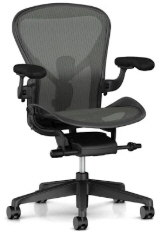
Seating Position. Raise so your feet are flat on the floor and thighs level. Seems weird to begin with, but if you don’t your knees and ankles will not thank you a few weeks in. I am lucky enough to have spent an entire work bonus on a Herman Miller Aeron chair … and after over 10 years working full-time from it … and I am in good shape. It’s commonly accepted as the best, but is pricey, and looking at a few reviews other chairs are now excellent too.

Get a keyboard. Laptop keyboards suck for long periods of use, wrists get sore and knuckles ache. I’ve never used a wrist-rest but they’re still around so consider one if you need.

Use a Mouse. Trackpads/touchpads are nice but a poor for complex/precision work and again no good for longer periods use. The new wave of gaming mice available are nicely designed and have a solid feel. They’re usually wired (shock!) with wireless ones quite expensive, but have hugely advanced speed/sensitivity, quality switches and useful customization short-cut options. I use a simple gaming mouse (without flashing lights) at home, and a traditional mouse when out.

Health, Fitness and Community

This article considers a few well-being type impacts of being isolated and ways to get the most out of this situation.

Health. One positive aspect of working from home is the reduction in picking up colds and other infectious illnesses from co-workers. It’s well know how air conditioning/HVAC systems spread germs around a building and communing together is always going to spread infection. There is, of course, a counter argument that isolation can reduce tolerance built up by exposure to small amount of disease.

Fitness. Personally, and I think it is fair to say generally it’s easier to get exercise when working from home. You can fit in a run, a class, or a gym visit based on your schedule and because you’re usually closer to the facilities. While this might seem self-indulgent (‘I wouldn’t suddenly disappear if I was in the office’), if done with good-conscience you’ll be more productive and happier because of it. In countenance, many office locations have onsite (or nearby) fitness facilities too – so it depends on every situation of course.

Social. Many people make friends (and romantic relations) with people they meet through work, and when you rarely meet or see this group of people this becomes hard to achieve to the same degree. Certainly in this age of virtual-relationships (i.e. without a physical presence) it can still exist, but all the subtle factors involved in social (vs professional) interactions are inhibited. Indeed attempts at establishing social relationships are often frowned upon – just this week I noticed some initial social chit-chat interactions on a conference call went passed an invisible ‘line’, frustrating others on the call.

Visually Present. One lesson I got from an amazing manager I had in the past is to always use video calling. The facial and body-language communication enrich interactions substantially, and it goes a long way to prove you’re attentive and engaged.

Get Out. As opportunities for close social interactions at work fade, it is down to the individual to seek them out elsewhere, and avoid the lazy option of becoming a social hermit. Get an interest that takes you out of the house and – most importantly – commit to it. If you want to maintain happy and effective full-time working from home, this is an essential.