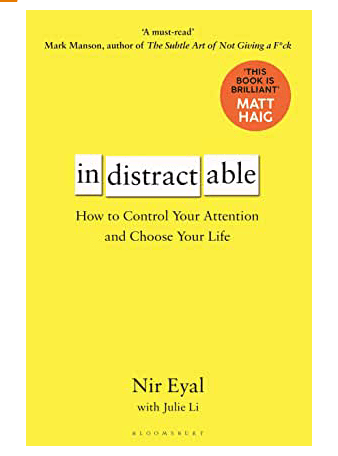
Book Review: Indistractable

This is the new title from Nir Eyal, the author of the well-known ‘Hooked’ which uncovered the research behind how social media (and other tech products) keep their users engaged. This new book took him five years of research and essentially offers advice on staying focused.

The book does a great job of explaining the Human Psychology behind much of what we all experience every day. Nir uses simple terms to cover many academic studies and uses lots of relatable examples.

The essence of the book is down to a neat set of four practices to help avoid distraction. Without going into the detail they deserve, these are:

  • Removing External Triggers – controlling gadgets, environment and people.
  • Controlling Internal Triggers – managing the day and tasks properly.
  • Make Pre-commitments – make pacts to help you stay on task.
  • Make Time – set times for the enjoyable things.

Sweeping insights that get made throughout the book include the proposition that our over-use of technology is actually helping us avoid pain. That might be having specific interactions, honest conversations or trying to work in a dysfunctional culture.

As such busying ourselves with invented tasks (like meetings and email) allow us to do something which looks like progress but often isn’t.

As you’d expect there is a lot about using settings on gadgets and leveraging proper calendar time-boxing to really get things done.

The book clearly focuses on jobs that include a decent amount of solo tasks generating creative output – like writing, programming, or design. That said I don’t think anyone can ignore advice on reducing distraction and this interesting and accessible book is a treat.


Productivity Test: The Pomodoro Technique

I happened across (lifehacker) this productivity technique a few weeks ago and it seemed similar to what I already do. Since the easiest change is the one that is the smallest, I tried it out. Here is a summary.

In essence, this helps you run short periods of focused work, dedicated to a single task. The idea is a dedicated time slot means no lost effort task switching, and distractions are deferred. In fact, dedicated breaks are part of the process and should be strictly non-work. This helps you keep your brain fresh, returning to concentrated on the next ‘Pomodoro’ period.

  1. Choose a task you’d like to get done
  2. Set a timer for 25 minutes
  3. Work on the task until the timer rings
  4. When the timer rings, put a check-mark on a piece of paper
  5. Take a short break – 5mins. Go back to step 2.
  6. Every four 25 minute periods, take a longer break (20-30mins).

The paper record allows you to quantify and report on the effort put into your tasks.

I tried this out and it works pretty well. I used the pomodoro.cc website as the timer and rudimentary task tracker. I found the approach did help focus my attention when deliberately starting out a period of work. The breaks came naturally also, and again starting the next chunk of work made this manageable.

I believe that my own work practice did resemble this kind of stop-start approach anyway, and while I stopped using the timer I do more deliberately focus within each period in the knowledge that a break is coming soon. As such I would rate this 4/5.

Reducing Home-bound Interruptions and Distractions

Like the now ‘classic’ video below, interruptions can be painful, whether you’re on a video call, phone call, or just trying to get a task done. As such here are some tips to avoid this.

Schedule and Share It. I tell anyone in the house what my schedule is for the day. They know (from me telling them) that at those times they should not bother me, plus they should not make too much noise (vacuum, exciting pets, playing music etc). My schedule is mostly phone/video calls, however sometimes includes deep-focus tasks too. I remind folks just beforehand if I don’t think they’ve remembered too (“Hey, just going on a call – be finished at 3 o’clock”).

Close Doors. I have an office room, therefore I can close the door if I need and this indicates I am not to be disturbed, except in an emergency. Fortunately my children are old enough to understand this now. You might even consider locking the door (that would have helped the guy in the video above). If you don’t have a separate room, consider getting (or making) a room-dividing screen or simply a ‘Do Not Disturb’ sign that you can put out.

You’re Not Childcare. For young children, it’s pretty impossible to work productivity and offer your children care. It doesn’t work and attempting it is a big mistake … for your work, your child, and for you! If you can only get periods of childcare, then use those to work.

Decide When To React. Remember what would happen at home if you were actually in the office. Nothing basically. As such you can let some home calls go to voicemail, or let a delivery driver put the package in the safe place or with a neighbour. Don’t jump to everything, ignore some.

Hush Your Personal Mobile Phone. Simply turn the notifications sound down, and flipping the phone over is easiest. Allocate a specific break time for checking it.

Keep Your Work Laptop Clean. Don’t be tempted to put your own things on your work laptop. Often this breaks company policy anyway, but keeping personal items (apps, music, photos, websites etc) away from yourself during work time reduces potential distraction.

Keep Availability Promises. If you want people to respect when you’re unavailable, then they need to know when you will be available. If you keep letting them down and doing extra bits of work when you said you’d be free, then they’ll probably let you down sometimes! That’s only fair!

Avoiding Self Destructive Behavior

One big problem with working-from-home is temptation. We fill our home with nice things for our time off, and when these things are nearby it takes a will-of-iron to ignore the lure. Here are a few techniques I use:

Media. As my only permitted media while working- Radio works for me. It prevents me from messing with music playlists or other audio services often designed to keep you engaged (i.e. distracted). It’s either on or off, and I always stick to one ‘calm’ station too.

Lunch hour. Keep a period scared for taking lunch. Sure get something to eat but also do those bits-and-pieces that might tempt you away from work. This includes keeping household chores and exercise to that time slot.

Good Environment. Ensure your office resembles a work area. Try to keep anything ‘interesting’ or ‘fun’ away from your work area.

Make Commitments. Share your to-do list with your boss or another person you don’t want to let down. Do regular progress meetings with colleagues and set expectations on accomplishment. If you can’t do this consider using a habit-forming app, there are some good ones out there.

Good To-Do Lists. Try to make items on your list achievable. Consider the urgent-important classification and prioritize items. Try to think of anything that is not achievable in a day as a ‘mini-project’ and as such the whole thing is not a to-do list item, only the first stage is. Keep you to-do list visible, I still write in cheap (mostly freebies) notebooks, as it’s helpful to refer back sometimes.

Reduce Notifications. Turn them off – as much as you can. Silence your phone entirely and turn it face-down. Close email if you need to focus. Even consider turning off WiFi, if you can.

Don’t get Fired. Ultimately if you get distracted, your work will suffer. Eventually you boss will notice and that could spell disaster.